Social Process Tracing Environment
Overview and Motivation
Social process tracing experiments (SPTE for short) are two-stage experiments designed to simulate the two-step flow of information by including both a fictional campaign environment and a social information-sharing environment.
Katz and Lazarsfeld’s (1955) two-step flow of information has long played a crucial role in theory building and theory-testing. However, most lab experiments focus on either information search and acquisition (with little attention to social interaction), or interpersonal communication and spread (with less attention to information search). The SPTE design draws on both social and psychological traditions, leveraging each one’s strengths and overcoming each’s limitations. In SPTE experiments, subjects first participate individually in a task within the contours of Lau and Redlawsk’s (1997; 2006) canonical DPTE design – they interact with a dynamic information board with the goal of collecting information and coming to a decision. Second, participants are placed into small deliberative groups and provided with a discussion task that encourages the dissemination of the information from the first stage (e.g., debating fictional candidates). By tracing subjects’ exposure to information and asking questions after each stage, researchers can isolate both content-related and process-related dimensions of the two-step flow of information.
What does a typical SPTE study look like?
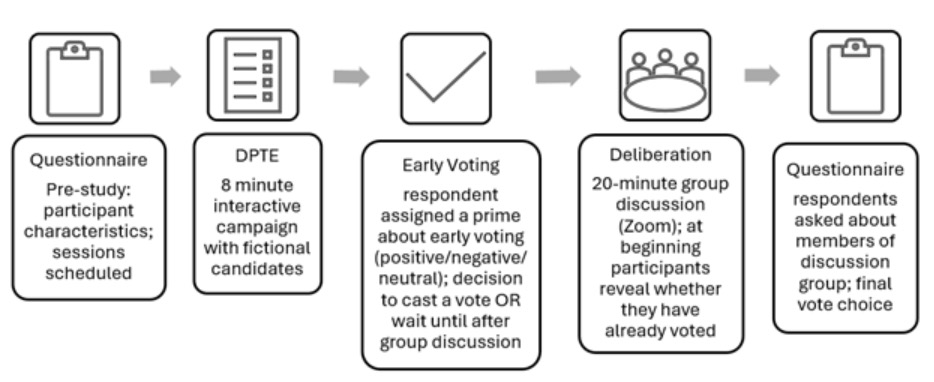
The prototypical SPTE design takes place during a 50-60 minute Zoom call, where subjects are instructed to arrive at a single coordinated time for each session. Insofar as the study only moves as fast as the slowest subject, we encourage researchers to build flex time into the study, while also developing a procedure for removing lagging subjects from the study. The session flow is as follows:
- Schedule participants for an in-person or video-conference session
- Preliminary instructions to subjects and consenting [5-7 minutes]
- Pre-test [3-5 minutes]
- Subject interaction with campaign [5-10 minutes]
- Mid-test [3-5 minutes]
- Reunion of subjects and instructions for discussion groups [3-5 minutes]
- Discussion group breakout sessions [10-20 minutes]
- Final instructions and post-test [8-10 minutes]
Implementation steps
When designing a SPTE study, researchers should begin by considering the following design decisions:
- Decide what study sessions will look like
- Talking Politics is designed with virtual sessions in mind: subjects attending a Zoom call, completing surveys on their personal computers, and joining discussion groups via the Zoom breakout group function.
- However, other formats may be possible. For example, a study utilizing in-person sessions could still use virtually all the features of Talking Politics; researchers might use a bank of computers in a lab to carry out the surveys and information board, while having discussion groups meet in person.
- Sessions of 50-60 minutes are typical, although shorter study sessions can be achieved by altering the length of the campaign, the discussion sessions, or the surveys.
- Select a campaign scenario
- What contextual information they wish to provide in instructions to subjects? (e.g., type of election, location of election, election rules)
- How many candidates are competing?
- Do the candidates have party affiliations, and if so, are they members of the same party (primary election) or different parties (general election)? For primary studies, researchers will likely want to create separate information boards for each (major) party so that subjects can participate in their own party’s primary.
- Create campaign content
- Researchers have two options: (1) use pre-populated sets of fictional campaign information available here on Talking Politics or (2) design their own information boards. Research can also use the pre-populated sets and edit them.
- Design the group discussion scenario
- How long the discussion groups will meet for? What is the default size of the groups? Will the construction of the groups be random or constructed based on some subject trait? These decisions are largely irrelevant to the design within Talking Politics Research platform, except that the default group size should be factored into the egonet battery if you use one.
- Decide how to conduct questionnaires
- Talking Politics includes three survey modules (pre-test, mid-test, and post-test). Decide which questions to include in each.
- Decide on subject recruitment and compensation
- Ensure you have a protocol for subject arrival, Zoom breakout room management, and final payment.
How can I construct a SPTE on this site?
Once you log into the Research Dashboard, you can create surveys, design your information board, and create many more features.